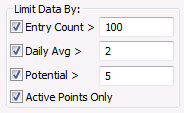
The Limit Data By options determine how the data analyzed from the VHS is displayed.
Points that meet the minimum criteria for the limits selected are listed individually with their corresponding statistics. Points that don’t meet these criteria will be summed together and shown as a single row labeled **Sum of minor points (n). The limit options can be used individually or in combination. They are cumulative and only points that meet all the enabled requirements will be displayed individually.
If no limits are set, each point will have its own entry and the **Sum of minor points (n) row will be empty. In essence, this is a copy of the VHS, and is an ineffective way to view and manage large amounts of VHS data. It is strongly recommended that the limit options be used in a meaningful way to increase the speed of the analysis and limit the amount of data viewed on the screen.
| Limit Type | Description |
|---|---|
|
Entry Count > |
Includes only those points that have more VHS entries than the specified number. |
|
Daily Avg > |
Includes only those points that have a higher average of new VHS entries per day than the value specified. |
|
Potential > |
Includes only those points that would have more VHS entries than the value specified if that point was at its steady state. |
|
Active Points Only |
Includes only active points in display. |
Click Refresh to refresh statistics after changing a limit filter.
|
|
|

